Using Perplexity's Custom Connector to Analyse Endurance Training Data
Perplexity.ai is known for its web-grounded search and conversational AI powered by the Sonar models. What is less known is that you can connect Perplexity to external data sources and tools using the Model Context Protocol (MCP). This is the same standard that powers connections for Claude, ChatGPT and others.
The Perplexity Custom Connector allows Perplexity to act as an MCP client that connects to MCP servers, which means it can read your endurance sports training history, analyse sessions, and answer questions about your fitness. Not as generic advice, but grounded in your actual numbers.
What the Perplexity Custom Connector can do
The Custom Connector allows Perplexity to act as an MCP client that bridges with any MCP-compatible server. Once connected, Perplexity can call tools exposed by that server and receive structured data in return. That turns Perplexity from a web search assistant into something that can reason about your personal data.
With an endurance sports MCP server like Tredict has one, this unlocks a few interesting endurance sports AI workflows:
- Ask Perplexity to analyse your recent training and assess fitness trends
- Have it pull specific sessions and explain what the metrics mean
- Request calculations that combine your data with general sports science
- Get answers that cite both your personal history and current web knowledge
The integration inherits Perplexity's strengths. Sonar models are fast, good at following instructions, and grounded in web sources by default. That last part is particularly useful. When Perplexity explains a training concept, it can cite recent research. When it calculates a metric, it can reference the methodology.
Connecting Perplexity to Tredict via MCP
The setup follows the standard MCP flow. You configure Perplexity to point at the Tredict MCP Server URL via its Custom Connector, authenticate via OAuth, and Perplexity discovers the available tools: activity lists, workout creation, plan management, and more.
Once that is done, Perplexity can see your training data. The first time you ask it a question about your running, it calls the Tredict tools, retrieves your history, and reasons about it in the same conversation where you asked.
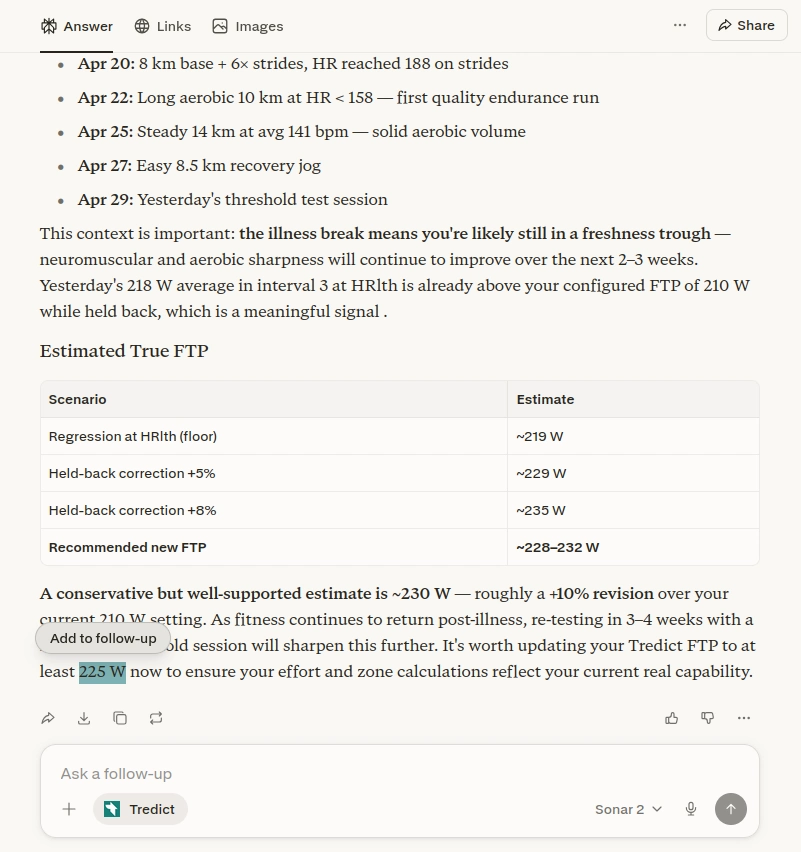
A real example: determining Functional Threshold Power
I asked Perplexity a simple question: can you determine my current running FTP?
With the Tredict MCP Server connected, Perplexity did not just explain the concept. It called my activity list, pulled recent runs with heart rate, pace and power data, and applied the standard FTP calculation methodology. The result was not a generic estimate based on my stated fitness level. It was derived from my actual sessions: my recent 10km race pace, my threshold runs, my easy run heart rates. The model even flagged that my current easy power suggests a slightly higher aerobic capacity than my last tested FTP would indicate.
What is interesting is how Perplexity combined sources. It used my Tredict data for the personal numbers, then cited current sports science literature for the FTP calculation method and the typical ranges for runners at different levels. That grounding in web sources is something Perplexity does natively, and it adds context to the personal analysis.
Where this gets powerful
The combination of personal data access and web-grounded reasoning creates possibilities that neither side offers alone:
- Data-backed advice with citations: Perplexity can explain training concepts and back them up with recent research, while using your actual data for the specific numbers
- Real-time knowledge: If a new training methodology emerges, Perplexity can incorporate it immediately, applied to your current fitness state
- Conversational exploration: You can follow up, ask for clarifications, or request different calculations, all while Perplexity maintains the context of your training history
The limits and the trade-offs
Perplexity's context window is smaller than Claude's, which means complex multi-step operations hit limits faster. Creating a full 12-week training plan with nested interval workouts is probably stretching it. But for analysis, assessment, and single-session planning, it works well.
The other consideration is data privacy. By connecting Tredict via MCP, you are sharing your training data with Perplexity during the conversation. That is the same trade-off as with any AI assistant. The difference is that Perplexity is primarily a search company, not a training platform, which may affect your comfort level with where that data goes.
Getting started
If you want to try this yourself, the setup is straightforward:
- Enable the Custom Connector in your Perplexity settings or client
- Add the Tredict MCP Server URL (available from Tredict's documentation)
- Authenticate via OAuth
- Start asking questions about your training
The Tredict FAQ on connecting Perplexity has the technical details. For a look at what the MCP Server exposes, the technical overview on this site covers that in detail.
Once you are connected, you can go beyond single analyses and use Perplexity to build a reusable training plan library directly in Tredict.