Interactive MCP Apps render real UI inside Claude and ChatGPT
Most MCP servers return text. You ask something, the model fetches data and writes back an answer. That is useful, but it is still just text in a chat window.
Tredict does something different with two of its MCP tools. Alongside the structured data for the model, they also return a UI resource that the chat client renders inline. The model still gets the numbers, and on top of that the user sees an interactive widget, styled the same way it looks in Tredict itself. Anthropic calls this capability Interactive MCP Apps. In the OpenAI ecosystem the same thing is usually referred to as ChatGPT Apps.
Looking at an endurance sports activity in the chat
Ask ChatGPT something like "show me my last run from Porto in the Tredict
UI". ChatGPT calls the Tredict activity list, finds the right session and
then calls the show-activity-ui tool. What appears in the chat is not a
text summary. It is an interactive activity widget with metrics, time
series charts, lap breakdown and a map, rendered inline in the
conversation.
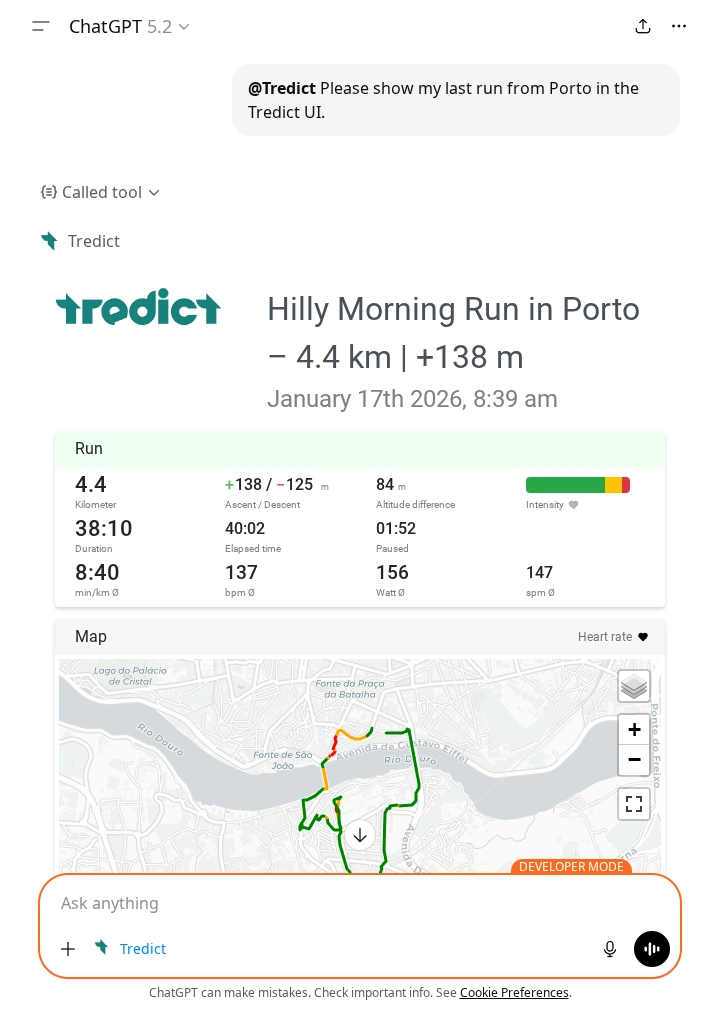
show-activity-ui widget rendered inline in ChatGPT. Metrics, intensity distribution and the interactive map show up in the same view you know from Tredict.It is the same intensity distribution, the same time series charts, the same map you already know. No new visual language to learn, no translation step in your head. Training data is visual by nature. A heart rate curve, a pace chart, a map of a route, these are not things that compress well into prose. Seeing them in their familiar form is how you actually read them.
Looking at a training plan in the chat
The same happens after plan creation. Once Claude has built a training
plan and written it into Tredict via the MCP Server, it calls
show-plan-ui. The plan appears in the chat as an interactive calendar
view, with the individual workouts across weeks, exactly as they look in
Tredict.
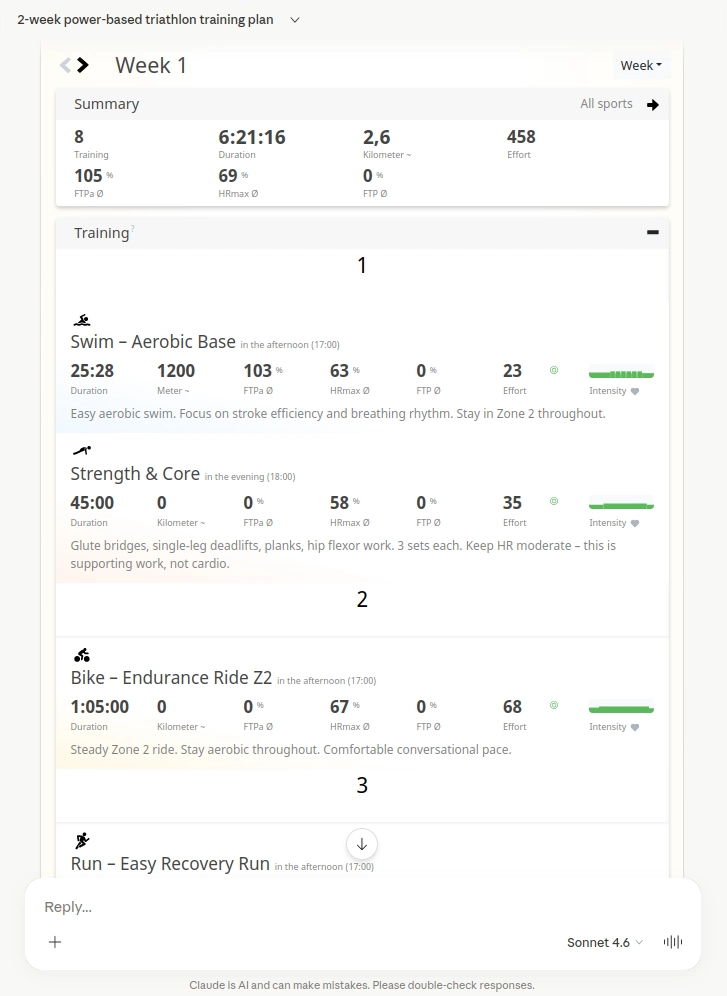
show-plan-ui widget in Claude.ai. You can click through the weeks and inspect the structured workouts without leaving the conversation.The widget is where the interactive side really pays off. You can skip through the weeks, look at the structured workouts, read the form curve, all without leaving the chat and switching over to Tredict to inspect what was built. You are not reading a description of what was created. You are looking at the actual thing.
The context stays intact
The chat thread is not broken. You do not switch tabs, you do not lose your place in the conversation, and you do not have to come back and re-explain what you were doing. Data view and dialogue live in the same flow.
That is true for you as a user, and it is true for the model. Whatever is on screen is still part of the conversation both of you are having.
The trade-off with user data
When I first thought about UI widgets in the chat, I assumed they would be a clean way to keep user data out of the model's context. In practice it works the other way around.
The reason is that MCP App widgets are static resources. They are essentially a sandboxed iframe with HTML that the chat client renders. That iframe has no authenticated session with Tredict, no user token, no way to call the Tredict API on its own and fetch something user-specific. Everything the iframe shows has to be handed to it, and the only channel for that is the tool response. So your activity data, your plan, your form curve, all of it travels inside the response payload. And because tool responses go through the model before they reach the client, that data lands in the conversation context whether you planned for it or not.
For pure visualisation that is arguably overhead. The model reads numbers it will never need to talk about.
It pays off the moment you do want to talk about them. A question like "why did my heart rate drift in the second half?" or "which week has the highest load?" only works because the numbers are already in context. Same for a plan review. The same property that costs context is what makes the analysis dialogue possible at all.
So whether it reads as cost or benefit really depends on what you are using the widget for. For a quick glance it is overhead. For a real conversation about your training it is exactly what you want.
Which platforms actually render MCP Apps for end users today
For endurance athletes the honest answer is Claude.ai and ChatGPT. Both render the Tredict widgets inline, and both work well enough that the flow described above is the actual user experience, not a demo.
Developer-oriented clients like VS Code and Goose can render MCP Apps as well, but these are not tools an endurance athlete reaches for to plan training or look at their run.
MCP Apps support in Open WebUI
Open WebUI does not support MCP Apps natively at the time of writing. There is a community plugin called MCP Apps Bridge that tries to close that gap. To be fair, that plugin does not really seem to be aimed at end users in the first place. It reads more like a proof-of-concept to show the Open WebUI project that MCP Apps can work inside their client, hoping to push them towards adopting it properly. The setup is far too involved for anyone who just wants to use Tredict in their chat, and in my tests the widgets never rendered. The tool requests ended up as plain text in the chat instead of triggering the widget render. Not usable as a real option right now.
I would really like to see Open WebUI support MCP Apps natively at some point. Self-hosted or managed AI clients are an important part of the ecosystem, and it would be good if interactive widgets were not limited to the two big commercial chat products.
MCP as a delivery channel for interface, not just data
Most MCP servers are data pipes. They get information in and out of a system so the model can reason about it.
Tredict MCP Apps point at something beyond that. MCP becomes a way to deliver actual interface elements into AI clients, not just data. The familiar Tredict UI shows up where the conversation happens, and the conversation keeps going around it.
It is early, and rendering support is still limited to a few clients. But it shows where this can go once more platforms adopt the capability.
The Tredict MCP Server documentation has the technical details on both UI tools. The official Tredict ChatGPT Connector App is the quickest way to get started on the ChatGPT side. If you want to see the full picture of what the MCP Server exposes to Claude, the technical overview on this site covers that in detail.
The previous article looks at Claude Code as the terminal counterpart to this, where the workflow is built around structured output and bulk operations rather than inline widgets in a chat. The next article goes the other direction and shows Claude doing a piece of real analysis on the time series data behind those widgets, normalizing ground contact time to a reference pace.